
Appearance
Tạo cuộc gọi
API tạo cuộc gọi tự động với kịch bản. Hỗ trợ gọi tới một số điện thoại (single call) hoặc nhiều số cùng lúc (batch call).
Luồng xác thực & tương tác
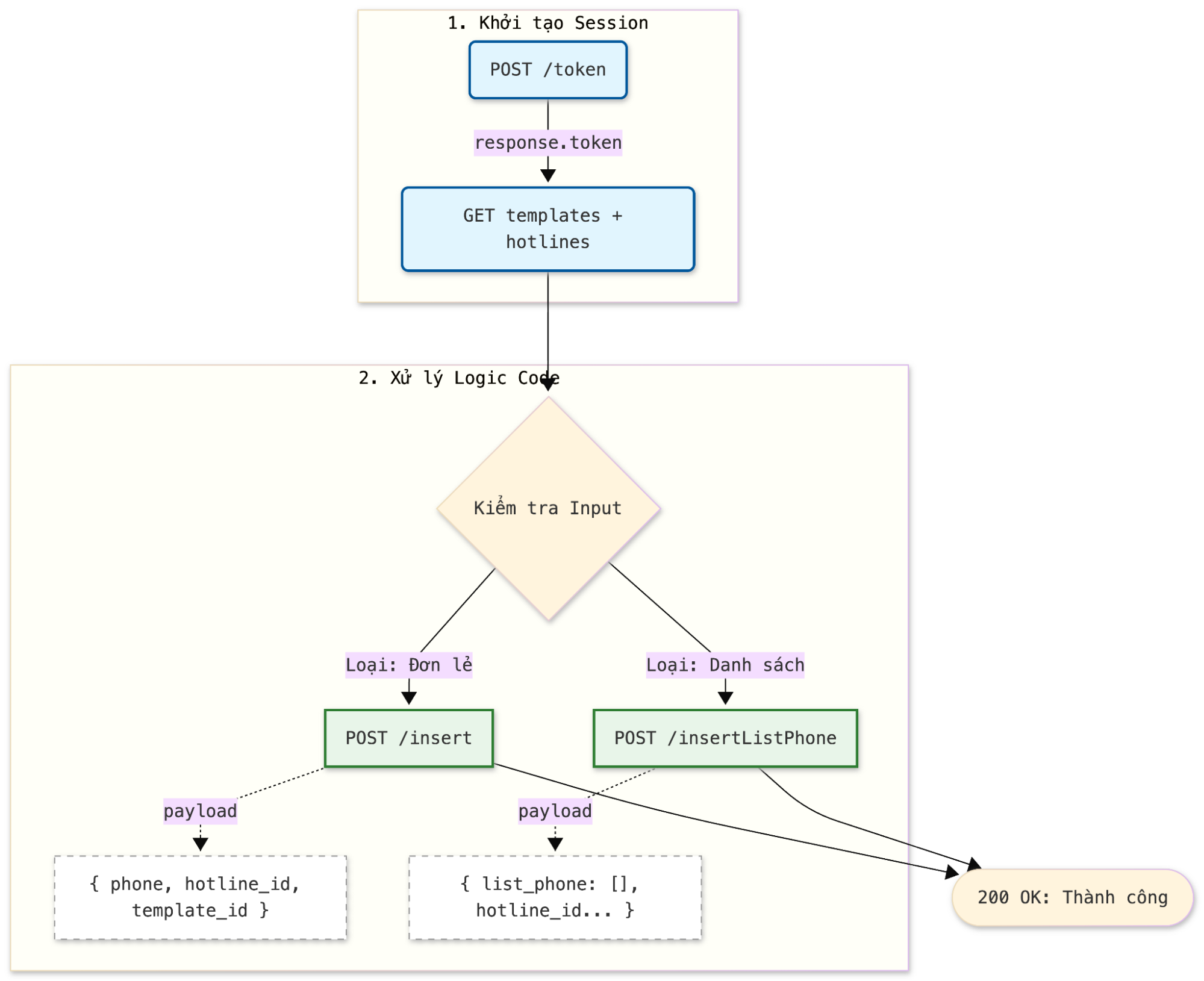
Tạo cuộc gọi đơn lẻ
Tạo cuộc gọi tới một số điện thoại duy nhất.
POST[URL]/api/campaignCall/callConfirm/insert
Header
| Tham số | Giá trị |
|---|---|
| Authorization | Bearer access_token |
Body
| Tham số | Kiểu | Bắt buộc | Mô tả |
|---|---|---|---|
| vbot_id | String | Có | VBot ID |
| project_code | String | Có | Mã dự án |
| phone | String | Có | Số điện thoại cần gọi (format: 09xxxxxxxx) |
| hotline_code | String | Có | Số hotline (số tổng đài) |
| template_code | String | Có | Mã template script |
| max_time | Int | Thời gian tối đa gọi (giây), -1 = unlimited | |
| max_waiting_time | Int | Thời gian chờ tối đa (giây), default: 30 | |
| external_call_id | String | Mã cuộc gọi từ hệ thống bên ngoài | |
| datas | Object | Dữ liệu biến thay thế trong kịch bản |
Ví dụ request
json
{
  "vbot_id": "123",
  "project_code": "PROJ_001",
  "phone": "0912345678",
  "hotline_code": "0812345678",
  "template_code": "CONFIRM_ORDER",
  "max_time": -1,
  "max_waiting_time": 30,
  "external_call_id": "EXT_CALL_001",
  "datas": {
    "customer_name": "Nguyễn Văn A",
    "order_id": "ORD_12345"
  }
}
Response
| Tham số | Kiểu | Mô tả |
|---|---|---|
| error | Int | Mã lỗi (0: Thành công, khác 0: Có lỗi) |
| message | String | Thông tin |
| data | Object | Thông tin cuộc gọi |
Ví dụ response
json
{
  "error": 0,
  "message": "success",
  "data": true
}
Tạo cuộc gọi hàng loạt
Tạo cuộc gọi tới nhiều số điện thoại cùng lúc.
POST[URL]/api/campaignCall/callConfirm/insertListPhone
Header
| Tham số | Giá trị |
|---|---|
| Authorization | Bearer access_token |
Body
| Tham số | Kiểu | Bắt buộc | Mô tả |
|---|---|---|---|
| vbot_id | String | Có | VBot ID |
| project_code | String | Có | Mã dự án |
| hotline_code | String | Có | Số hotline (số tổng đài) |
| template_code | String | Có | Mã template script |
| phoneInfos | Array | Có | Danh sách số điện thoại |
| phoneInfos[].phone | String | Có | Số điện thoại |
| phoneInfos[].name | String | Có | Tên khách hàng |
| phoneInfos[].customerUid | String | Có | ID khách hàng (unique) |
Ví dụ request
json
{
  "vbot_id": "123",
  "project_code": "PROJ_001",
  "hotline_code": "0812345678",
  "template_code": "CONFIRM_ORDER",
  "phoneInfos": [
    {
      "phone": "0912345678",
      "name": "Nguyễn Văn A",
      "customerUid": "CUST_001"
    },
    {
      "phone": "0987654321",
      "name": "Trần Thị B",
      "customerUid": "CUST_002"
    }
  ]
}
Response
| Tham số | Kiểu | Mô tả |
|---|---|---|
| error | Int | Mã lỗi (0: Thành công, khác 0: Có lỗi) |
| message | String | Thông tin |
| data | Object | Thông tin batch call |
Ví dụ response
json
{
  "error": 0,
  "message": "Batch call campaign được tạo thành công",
  "data": {
    "batch_id": "BATCH_20240110_001",
    "phone_count": 2,
    "status": "processing"
  }
}
Lấy trường tùy chỉnh trong kịch bản
Lấy danh sách các trường tùy chỉnh (custom field) được sử dụng trong một template script cụ thể.
GET[URL]/api/campaignCall/callConfirm/getCustomFieldInScript?vbot_id={vbot_id}&project_code={project_code}&template_script_code={template_script_code}
Header
| Tham số | Giá trị |
|---|---|
| Authorization | Bearer access_token |
Tham số
| Tham số | Kiểu | Mô tả |
|---|---|---|
| vbot_id | String | VBotID |
| project_code | String | Mã nhóm |
| template_script_code | String | Mã template kịch bản |
Response
| Tham số | Kiểu | Mô tả |
|---|---|---|
| error | Int | Mã lỗi (0: Thành công, khác 0: Có lỗi) |
| message | String | Thông tin |
Ví dụ response
json
{
  "error": 0,
  "message": "Success",
  "data": [
    {
      "id": 1,
      "cfname": "Tên khách hàng",
      "cfkey": "customer_name",
      "description": "Tên khách hàng để xưng hô",
      "cftype": "text",
      "isRequired": true
    },
    {
      "id": 2,
      "cfname": "Mã đơn hàng",
      "cfkey": "order_id",
      "description": "Mã đơn hàng cần xác nhận",
      "cftype": "text",
      "isRequired": false
    }
  ]
}